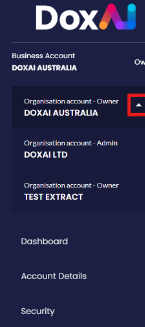
In DoxAI, there are two types of accounts:
Personal
Organisational
Additionally, there are three user roles, each with distinct levels of access:
User Roles and Permissions:
Owner: The super user of the account. Owners have full administrative rights, including:
Creating and managing eSignature requests
Accessing all organisational settings
Managing templates, groups, and users
Assigning or removing Admins and Members
Admin: Admins have access to almost all functionalities except those reserved exclusively for the Owner, such as:
Managing most organisation-wide settings
Sending and managing eSignatures
Creating templates, groups, and dashboards
Managing Members (but not Owners or other Admins)
Member: Members have restricted access and can only perform the tasks explicitly granted to them by the Owner or Admin, such as:
Viewing assigned templates or documents
Signing documents
Limited visibility to organisation data
Was this article helpful?
That’s Great!
Thank you for your feedback
Sorry! We couldn't be helpful
Thank you for your feedback
Feedback sent
We appreciate your effort and will try to fix the article